






Carburante: fast in, honest out
Carburante is an iPhone logbook for motorcycles: fill-ups, consumption, maintenance. I defined it, designed it and built it on my own, and it has been on the App Store in Brazil since 7 October 2026.

- Role
- Product designer and developer, solo
- Period
- 2026 to present
- Platform
- iPhone, iOS 18+. SwiftUI, SwiftData, Supabase
- Status
- On the App Store in Brazil since 7 Oct 2026
- Scope
- Product strategy, UX, UI, brand, motion, gamification, landing page, iOS development, AI-assisted workflow
I started from my own riding and from conversations with other riders about how they keep track of their bikes: spreadsheets, notes, apps made for cars.
Two details shaped the rest. At the pump, a rider has a helmet in one hand and a phone in the other, so logging has to cost almost nothing. And consumption is an average, so one wrong entry quietly spoils every number after it. The fastest way to log is to accept whatever gets typed or scanned, and that is exactly what an honest average can't afford.
Fast in.Honest out.
Three decisions follow from it: one about effort, two about trust.
Decision 1 of 3Effort
Three steps.
One number.
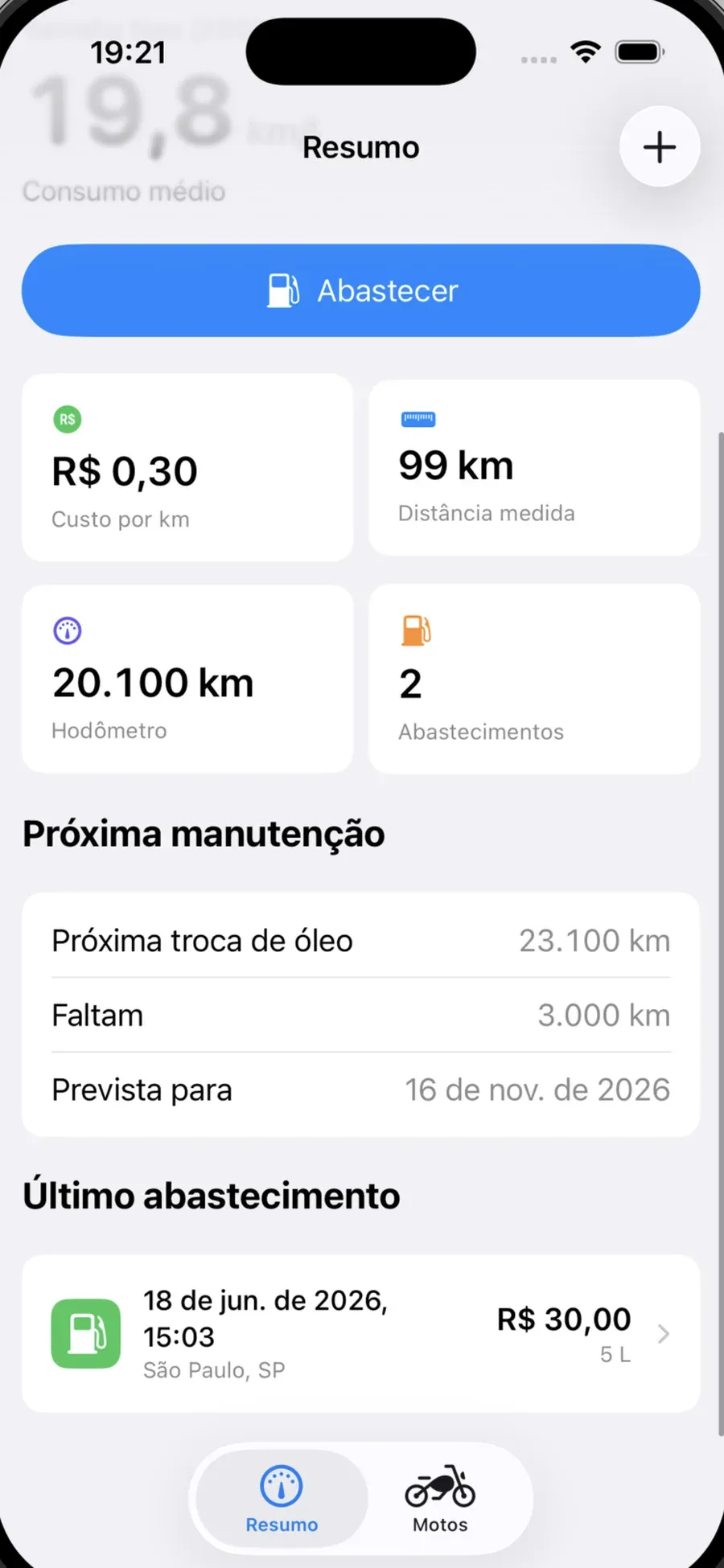
The Summary, the screen a rider sees every time the app opens, took three builds. The first was a native settings-style list, complete and correct, with average km/l as one grey row among twelve. The second borrowed from Apple Health: a hero number, plus a status banner, a full-width Fuel button, coloured tiles and a Wallet-style card.
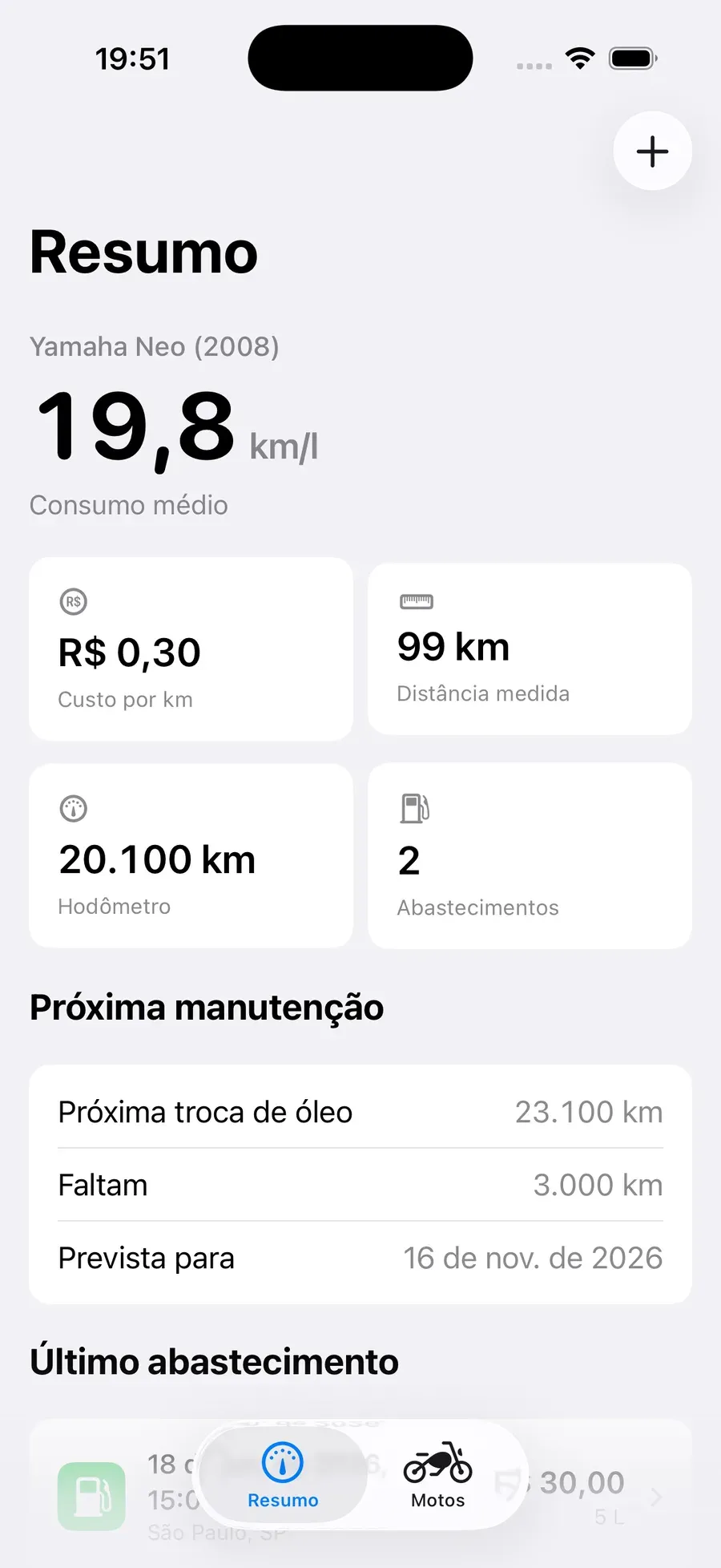
My note on it was short: simpler before, heavy now, too many buttons going to the same place. I had added instead of organising. The third build kept the hero number and the grid, moved the action to a + in the toolbar, dropped the banner (silence already means all is well) and took the colour out of the tiles.
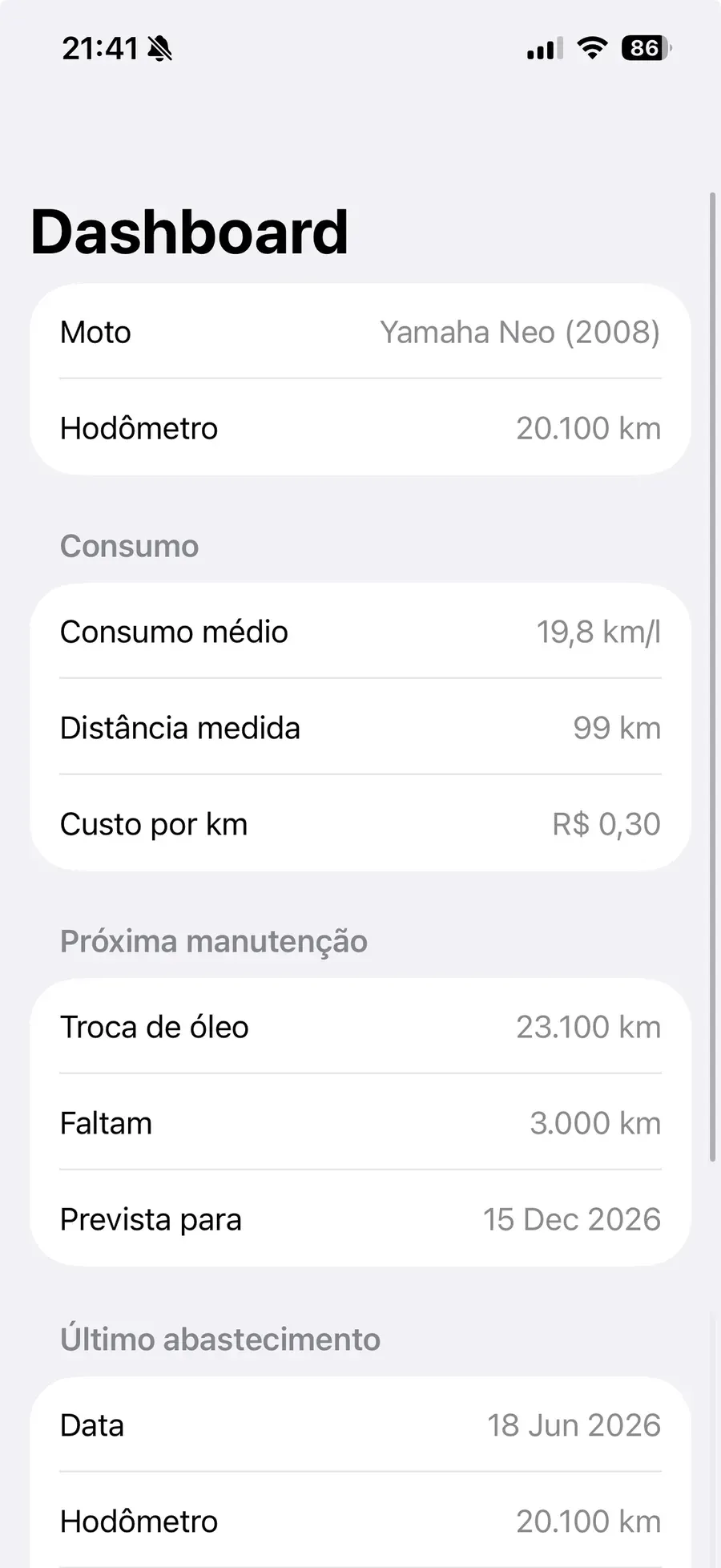
- v1 Settings-style list. Average km/l is one grey row of twelve.
- v2 Health-style cards. Five visual languages on one screen.
- v3 One hero number. Colour only where it means something.
That became the test for every screen: does this add weight or take it away? Logging got the same treatment. It is three steps, the phone fills in the date, time and place, and both numbers can be typed or read from a photo.
Even the chart waits. The first km/l needs two full tanks, so until then the Summary counts down the tanks still missing instead of drawing an empty graph.
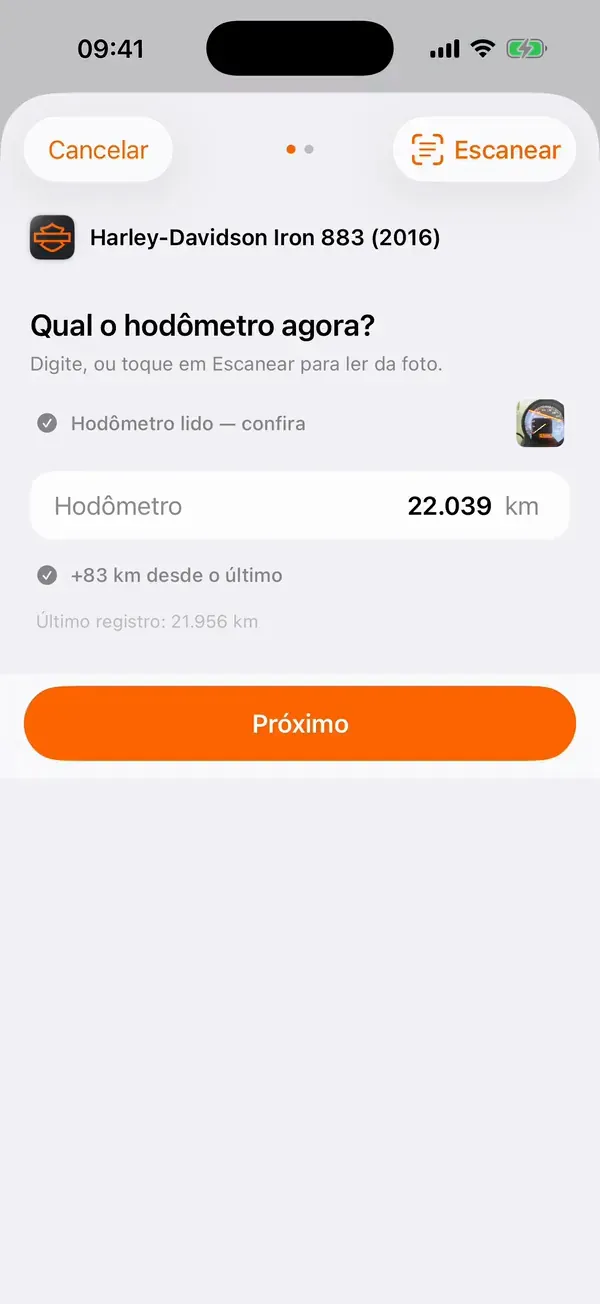
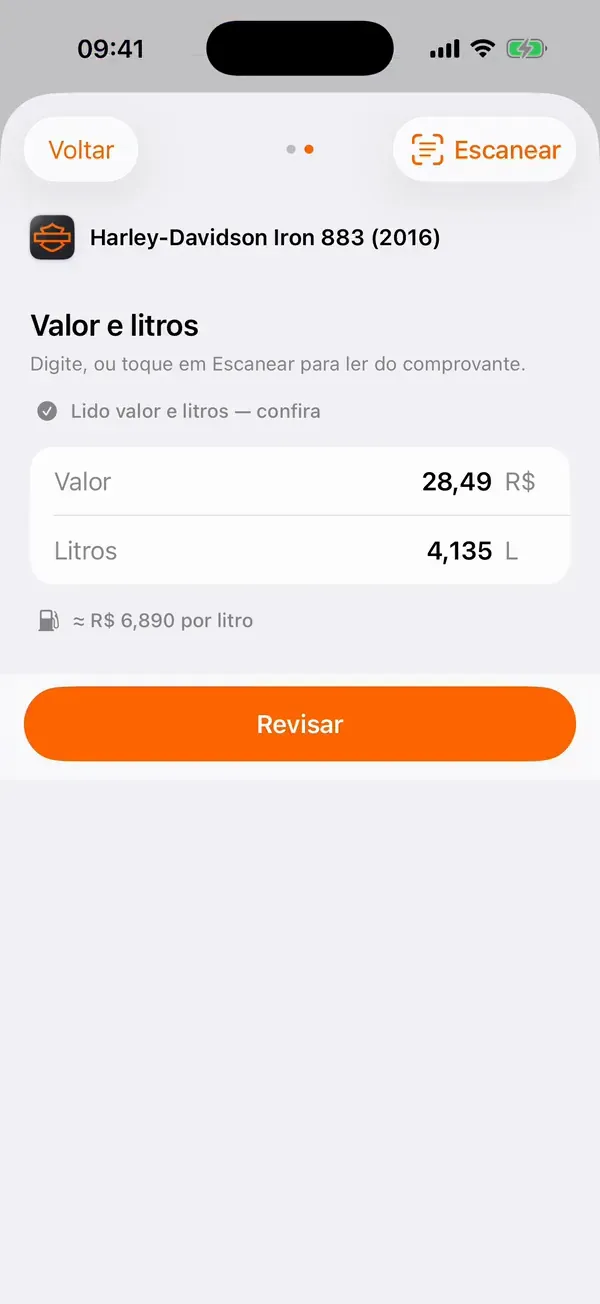
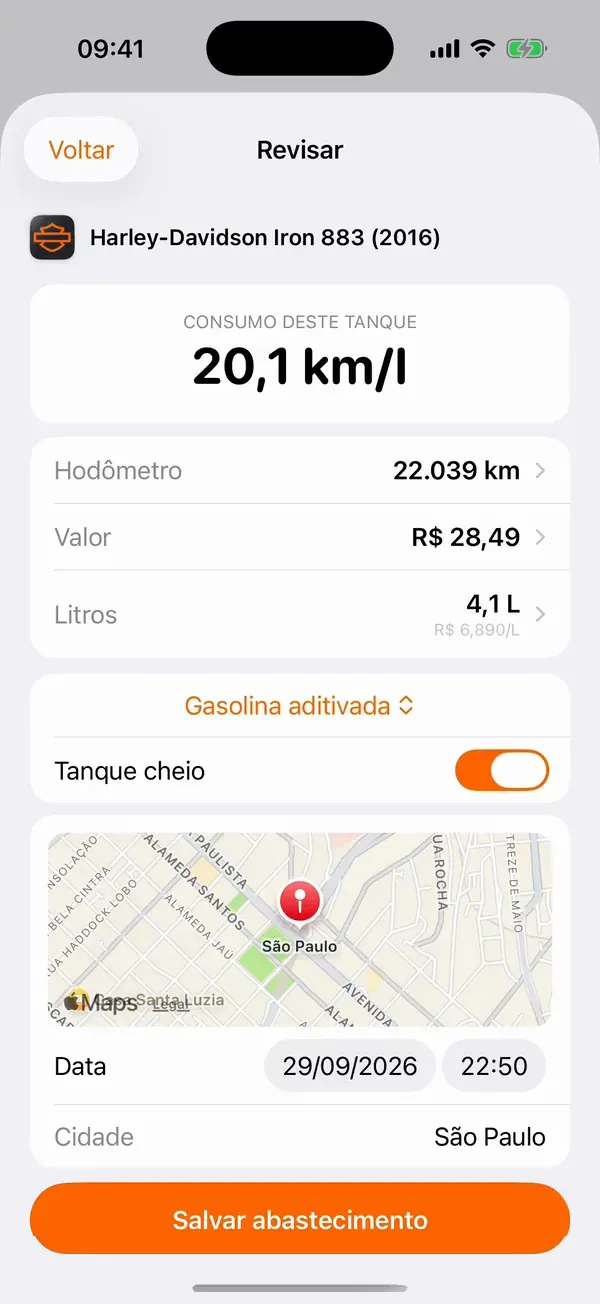
- Odometer. Typed, or read from a photo of the dashboard.
- Amount and litres. Typed, or read from the receipt.
- Review. Fuel type starts on the last one used. The tank's km/l shows before saving.
Decision 2 of 3Trust
OCR suggests.
The rider decides.
Apple's Vision framework reads the photo on the phone and fills in the fields. Its mistakes look like real numbers. On a Yamaha Neo's drum odometer it lost the first digit in the bezel's shadow and stuck the tenths roller on the end: 27,119 km became 71,190, once in three tries. At a pump, R$ 28.49 became 2,849, because the decimal point on the segment display never registered.
So the design assumes the reading will sometimes be wrong. OCR only fills fields, review is mandatory, and each check turns raw input into a figure riders have a feel for: kilometres since the last fill-up, price per litre, this tank's km/l. A misread total is easy to miss. R$ 633 a litre isn't.
Odometer · drum display
- On the bike
- Vision read
Pump total · segment display
- On the pump
- Vision read
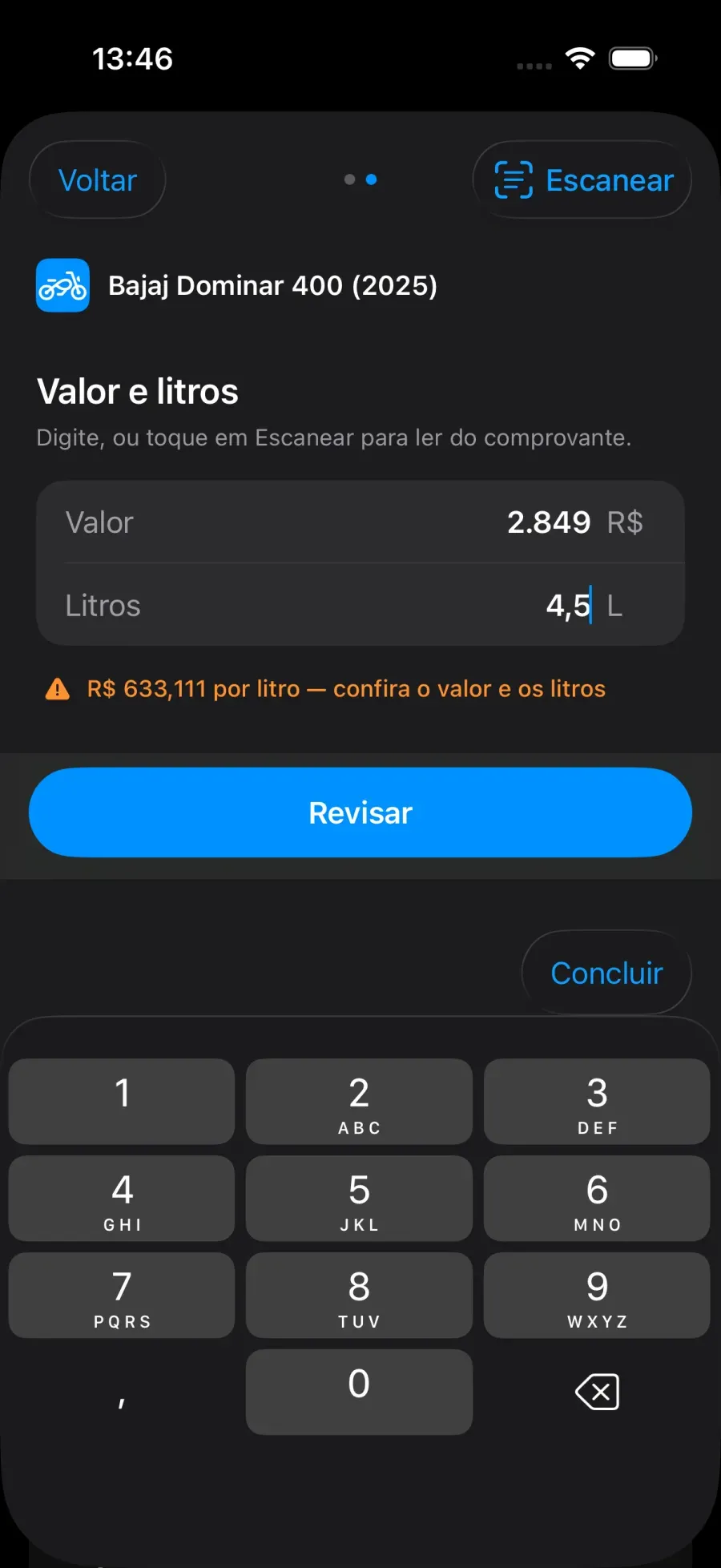
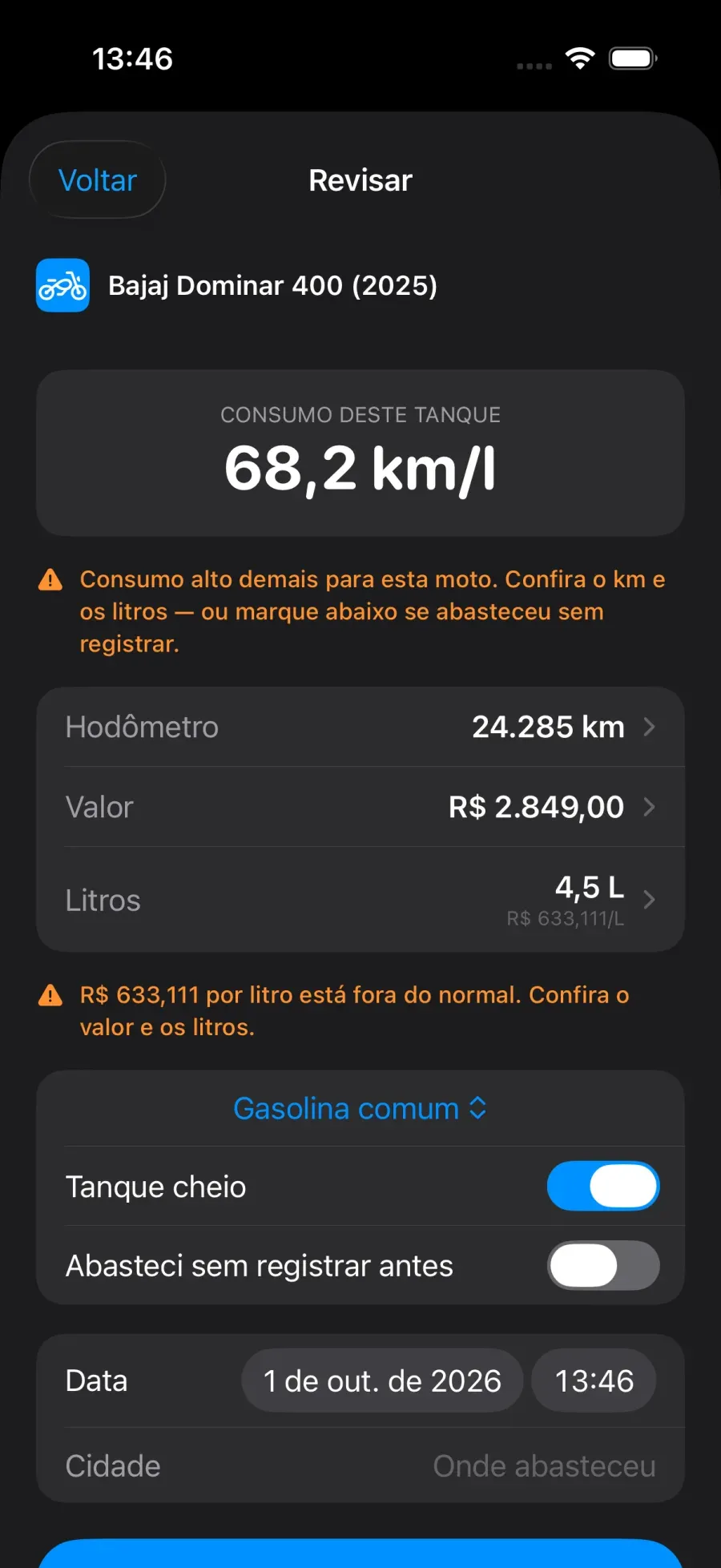
- Step 2 divides total by litres. Outside R$ 2 to 15 a litre the line turns orange. When this misread first happened, it was grey.
- Review shows the tank's km/l before saving, and flags it when it's far above the bike's usual.
- The warning names a second cause: fill-ups never logged, with a switch to mark them.
Readings from field photos, as logged in my test notes. Screens: simulator and demo data, with the misread entered to test the warnings.
Decision 3 of 3Honesty
A gap breaks
the measurement.
Consumption is the distance between two full tanks divided by every litre added in between. Dividing each entry by the one before is simpler, and wrong as soon as someone tops up halfway. But the method assumes nothing is missing.
Forget to log three fill-ups and the kilometres stay true while the litres don't: 1,066 km over 4 litres is 266 km/l, straight into the average, the chart, the records and the medals. A ceiling of 80 km/l now drops stretches like that. The harder case is a single missed fill-up, which roughly doubles the result. Wrong, and believable.
Naive division
- Full
- 3 never logged
- Full
1,066 km ÷ 4 L. The kilometres are true, the litres are not, and the result lands in the average.
With the gap rule
- Full
- Stretch dropped
- New anchor
No figure for this stretch. Kilometres, spend and odometer keep counting; consumption restarts from the new anchor.
A worked example from the gap rule's spec, not a measurement.
A big odometer jump has two causes that need opposite responses. A misread is a wrong number to fix. Missed fill-ups leave the number right, but the stretch before it can't count. The app can't tell which, so it asks: the odometer's check mark turns into an orange “check the km” with a button, “I filled up without logging”. Review warns at twice the bike's median km/l, about what one missed fill-up does.
A marked gap makes the next full tank a fresh start. Distance, spend and the odometer keep counting; only consumption skips the stretch, and the Summary says how many full tanks it needs to show a number again. The app never blocks a save or marks a gap by itself, since a wrong guess either way hides a real error. I chose a missing number over a plausible lie.
The product
The same rules,
everywhere else.
The accent colour follows the active bike's manufacturer, across ten brands: the rider's identity is the motorcycle, not my logo. But Harley and KTM orange is also the colour of “service due soon”, so state colour never comes from the theme. Maintenance bars are grey on track, orange from 80% of the interval, red when overdue.
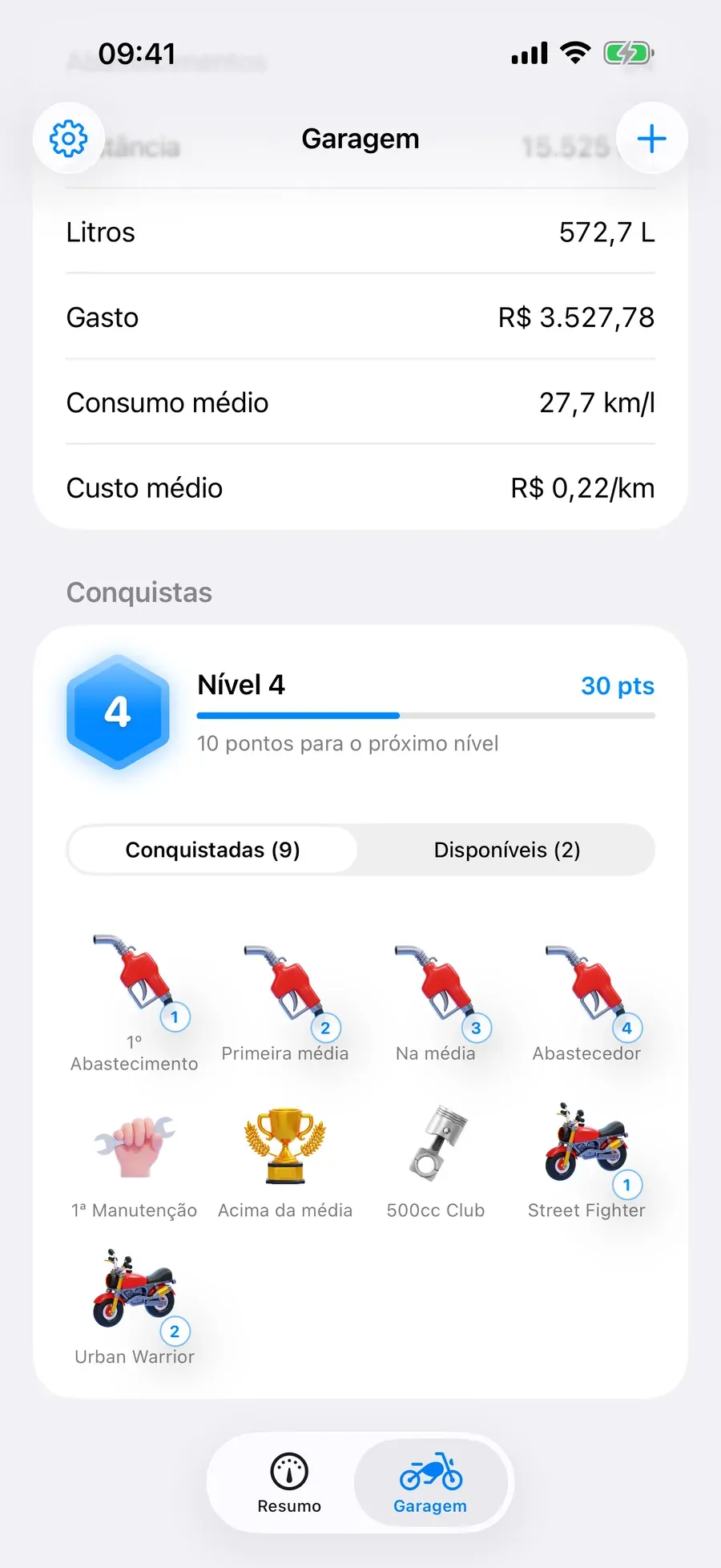
Habit matters because gaps are the problem from decision 3. There are 25 achievements and a ten-level profile on the store; levels unlock nothing, and backdated entries never earn a medal. With Premium, an earned medal can become the app icon. Group challenges, adapted from GymRats, are in TestFlight with no usage data yet.
 First fuel-up
 Above average
 First service
 500cc club
 Touring
 Street
- Maintenance, by kilometres or months. The tile is the service, the bar the state.
- Achievements, with a level that gates nothing.
- Consumption, by period and against the bike's category.
Demo data throughout. The 3D medals are AI-assisted.
Outcome
Shipped.
Not yet proven.
- Live
- 1.0 since 7 October 2026; 1.1, with an optional Premium plan, since 16 October. Everything described above except group challenges.
- In TestFlight
- 1.2: a reminder for riders who register a bike and never log, and drop-off events in the fill-up flow. 1.3: group challenges.
- Early signal
- The store data is small and points at one step: riders registered a bike and didn't come back for a first fill-up. It shows where they stop, not why.
- Not reached
- My success measure, set before launch: a rider logging more than three fill-ups. Nobody from the store has reached it yet.
- Not measured
- How long a fill-up takes in real use, and how often OCR gets it right. I have field cases, not rates.
Measure the steps as well as the result. I launched with fill-up events and a dashboard waiting for the third one, and nothing for the steps before it. When riders stopped, I could see where but not why. Bike-form events came in 1.1; fill-up drop-off is in 1.2. Next time, the OCR test photos come before the parser, too.
Check what the nudges depend on. The app asked for notification permission only after the first saved fill-up, so the riders who most needed a reminder could never get one. 1.2 asks right after the bike is registered. Shipping it is the next step, and the next thing to measure.
Screens and clips use demo data. The interface is in Portuguese; quoted labels are my translations. The 3D medals are AI-assisted. Written on 25 October 2026, with store data as of that day.